
Work From Home Back Pain: A Simple Setup and Movement Plan That Actually Helps
By Dr. Sakshi Bhatia, Physiotherapist, Vyana Care

"My back was completely fine before I started working from home."
We hear that line almost every week. Then everything changed. Now you work from the dining table. Or the couch. Or the kitchen counter, with your laptop sitting on a pile of books. And at some point along the way, your back started hurting.
It is almost never one thing. It is usually three things happening together. A desk that was never meant for work. Long hours of sitting. And a body that hardly moves all day.
The good part is that all of this can be fixed. You just need a little bit of a plan.
Why Working From Home Is So Rough on Your Back
A dining chair can hold your laptop just fine. But it was never built to support your spine the way a proper desk setup can. Most home workspaces were not planned out at all. They just kind of happened over a weekend, and then stayed that way for months.
Your spine likes to move. Small shifts. Standing up now and then. That is what keeps it happy. Sit slouched for hours and your lower back starts complaining pretty fast. Do it for a few weeks and things get stiff. Do it for a few months and the pain starts showing up even when you are not at your desk. In the evening. In bed. Whenever. The NHS guide to back pain points to the same everyday culprits — sitting for long periods and poor posture at a desk.
"But I sit up straight, I really do try." That one comes up a lot too. And here is the thing. Good posture is not one perfect pose you hold all day. Nobody can do that. It is just your body shifting around and finding comfort as the day goes on. A bad setup takes that away from you. Then the pain shows up. We have written more on why posture is not about sitting straight.
“Sitting is the new smoking.”
Signs Your Desk Setup Might Be the Problem
The early signs are small and easy to ignore. Most people describe them something like this.
"It is fine in the morning, but by 3 pm my lower back is killing me." Even on an easy day.
"I catch myself hunched over the screen ten minutes after I sit down."
"Getting up after a long call feels like a whole task now."
"My neck and shoulders are tight too, not just my back."
And the one we hear most often, "It is much better on weekends, and I am not even doing anything different."
If a few of these ring a bell, there is a good chance your setup is playing a bigger role than you realized.
Building a Desk Setup That Actually Supports Your Back
"So do I need to buy one of those expensive chairs?" Usually not. You do not need a standing desk either. A few small fixes to what you already have at home can go a long way.
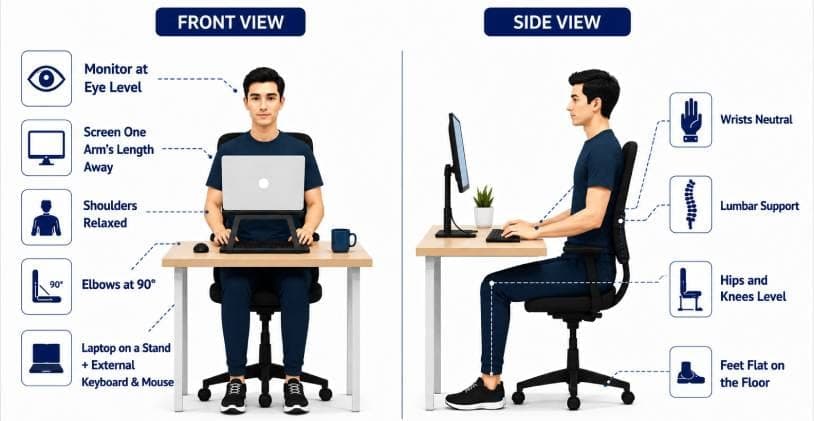
Start with your chair. Sit down and check your feet. They should rest flat on the floor, and your knees should be about level with your hips. If the chair is too high or too low, everything else goes off from there.
Next, think about lower back support. A simple cushion or even a rolled up towel placed at the natural curve of your spine can help a lot more than you would expect.
Now the screen. The top of it should be at eye level, or just a little below. That way you are not looking down or pushing your head forward all day.
Pay attention to your elbows as well. They should sit at roughly a 90 degree angle, and stay close to your body rather than reaching out in front of you.
Your screen should sit about an arm's length away from your face, not closer and not much farther.
One easy trick fixes two problems at once. Put your laptop on a few books or a laptop stand, and use a separate keyboard if you have one. That one change fixes your screen height and your elbow angle together.
The Movement Routine That Makes the Real Difference
A good chair and a well set up desk can only do so much. They cannot fix a body that sits completely still for eight or nine hours straight. Most people skip this part. And it is probably the part that matters most.
"I go to the gym four times a week though." We hear that one often, and it still does not cancel out nine hours of sitting. Moving a little through the day beats one heavy workout at night. Here is a simple routine you can follow.
| When | What to do |
|---|---|
| Every 30 to 45 minutes | Get up. Walk around the room, or stretch for a minute. Keep it simple. |
| Mid-morning | A doorway chest stretch, followed by five slow shoulder rolls on each side. |
| Right before lunch | A few standing side bends along with a gentle spinal twist. |
| Mid-afternoon | Take a short walk, when energy usually dips anyway. Even just to another room and back counts. |
| End of the day | A hip flexor stretch and a few minutes of walking. It clears out a lot of the stiffness you picked up. |
A few stretches are worth learning properly. These hit the spots that suffer the most from sitting.
- The cat-cow stretch is a great one. Get down on your hands and knees, and slowly arch your back upward and then round it downward. It keeps your spine loose and mobile.
- The standing hip flexor stretch also helps a lot. Step one foot forward into a gentle lunge position, and hold it for about 20 to 30 seconds on each side. Sitting for long stretches tightens these muscles more than people realize, and over time that tightness pulls on your lower back.
- Glute bridges are another simple one. Lie down, bend your knees, and lift your hips up slowly. These muscles go a bit lazy when you sit all day, and this wakes them up.
One thing to keep in mind. None of this should hurt. If a stretch hurts, stop doing it and get it checked.
Small Habits That Add Up
Your desk matters. But so do the little things you do through the rest of the day.
Drink water regularly. It helps keep the discs in your spine healthy, and it gives you a reason to get up and walk to the kitchen every so often.
Take calls while walking when you can. And try not to sit in the same spot for hours.
Also think about what happens after work. "I fixed my desk, so why does it still hurt in the evening?" Sinking into the sofa with your phone for two hours can undo everything your desk setup did for you all day. This is often where neck pain starts creeping in as well, even for people who have a great desk setup.
When You Should Get Your Back Checked
For most people, fixing the setup and adding more movement solves the problem within a few weeks. But there are a few signs that mean you should get checked out properly instead of just waiting it out.
Get it looked at if the pain lasts more than two to three weeks even after you fix your setup. Same if the pain travels down your leg, or comes with numbness or tingling. Back pain that wakes you up at night is worth taking seriously. So is weakness in your leg, or feeling unsteady on your feet. And if it all started after a fall or an injury, do not wait it out.
These signs do not show up often. But when they do, take them seriously. A physiotherapy assessment can tell you what is really going on. It helps a lot with lower back pain that keeps coming back even after you have fixed your desk. Sometimes the desk was never the whole story.
The Vyana Approach
Fix your desk. Add more movement into your day. Stick with it consistently. That combination solves work from home back pain for most people. The hard part is rarely knowing what to do. It is sticking with it long enough to actually see the difference.
Want your setup checked properly by someone who knows what they are looking for? Vyana Physiotherapy offers a virtual physiotherapy consultation you can do right from home. You get a plan built specifically around your desk and your body, not just a generic checklist copied from somewhere else.